01 / Cursor
Your cursor stays yours.
Keep using your apps while agents work in the background.
 Open source
Bring your agents into desktop apps, even the ones with no API.
Build your team in Braus, or connect your own agents over MCP.
Open DaVinci, create session 'test_carla', import the video from downloads 'carla_video.mp4', edit it making it black and white fast, zip it to downloads and send it to Loris on Slack.
18:00I’ll set up the DaVinci project, import the clip, apply a black and white grade and faster playback, then export, zip, and send it to Loris. I’ll check the available controls as I go and verify each output before sharing it.
DaVinci took focus on your display while its export panel opened, so Braus has paused the background controls. Please switch back to your own window; I’ll continue from the export panel once the seat is available.
Created and saved the DaVinci project test_carla, imported carla_video.mp4, made it black and white, and set it to 2× speed. The edited video is in test_carla_bw_2x.zip (/Users/mac/Downloads/test_carla_bw_2x.zip), and the ZIP appears in Loris’s Slack conversation.
Using chrome, can you search X for the top trending posts about computer use agents? Once you have them, rank them from most to least popular and draft a post for me, then I will schedule it.
18:59[…]
3. @Lummox_eth — "Build Your Own AI Employees on GPT-6 Astra: The A-Z Agent Playbook" (Sep 16)
157K views, 1.4K likes, 278 reposts, 96 replies
Long-form article framing agents as staff rather than tools.
4. @ataiiam (Atai Barkai) — "Introducing OpenMuse" (Sep 22)
155K views, 1K likes, 110 reposts, 55 replies
Open-source, self-hostable assistant that works with any agent harness.
Also in the top results, but I could not read their engagement counts — the metric rows sit below tall media and never rendered as text in the accessibility tree across several scroll positions:
The clear theme: the center of gravity moved from "agent that answers" to "agent that stays running" — always-on, own cloud computer, own browser, plugged into your existing apps. And the loudest open-source replies (OpenDots, OpenMuse, OpenMausBot) are all self-hostable answers to OpenAI's closed launch.
Draft post
Everyone's reading the dots launch as a model story. It isn't.
The shift is from agents that answer to agents that never switch off — own cloud computer, own browser, plugged into the apps you already pay for.
Which is why the most interesting replies weren't takes. They were repos. OpenDots, OpenMuse, OpenMausBot — all shipped within two weeks, all self-hostable, all betting the runtime matters more than the model.
The best line I saw on it, from a breakdown of Altman's own guidance: give it responsibilities, not tasks.
That's the whole gap. Tasks are what you delegate to software. Responsibilities are what you delegate to people.
A shorter, punchier alternative:
"Give it responsibilities, not tasks."
That's the line from this week's agent discourse that actually matters.
Tasks are what you delegate to software. Responsibilities are what you delegate to people. Every always-on agent shipping right now — dots, OpenDots, OpenMuse — is a bet that the second one is now possible.
The model was never the bottleneck. The runtime was.
Both are under 280 characters per paragraph block but run long as a whole — tell me if you want it cut to a single-tweet length, and I can tighten it. I haven't posted or scheduled anything; the Chrome session is still open on the search results if you want me to pull more posts or check a specific account.
Upload the final mix and the stems to the client’s folder, then send them the link.
17:42The final mix and all 12 stems are in Delivery, and the client’s folder is open in Chrome.
The folder already holds a mix from Tuesday. Should I replace it, or upload this one beside it as v2?
Turn my notes from Monday’s call into a checklist for the release.
16:05Here is the checklist from Monday’s call:
Export the album masters as 24-bit WAV files into the Masters folder, named by track number.
14:20All ten masters are in Masters as 24-bit WAV files, from 01 to 10. Nothing clipped on export.
Clean up the dialogue in scene 12: take out the hum and even out the levels.
19:10Scene 12 is clean: the hum is gone from all 14 clips and the lines sit at one level. I saved it as a new version next to the original.
This model doesn’t offer Effort levels.
What would you like to work on?
Turn the open notes into a checklist.
While an agent works in an app, Braus reads each window it opens: the controls, their labels and the groups they belong to.
Braus connects each action to what changed in the app. Controls, groups and observed effects form its Brain, a map built from use.
The next task starts with what Braus has learned. Your agent checks the current window before acting.
01 / Cursor
Keep using your apps while agents work in the background.
02 / Stop
Follow the activity in Braus. Stop the worker when you need to change direction, then review what it did.
03 / Input
Clicks and keystrokes go to that window without taking focus from your apps.
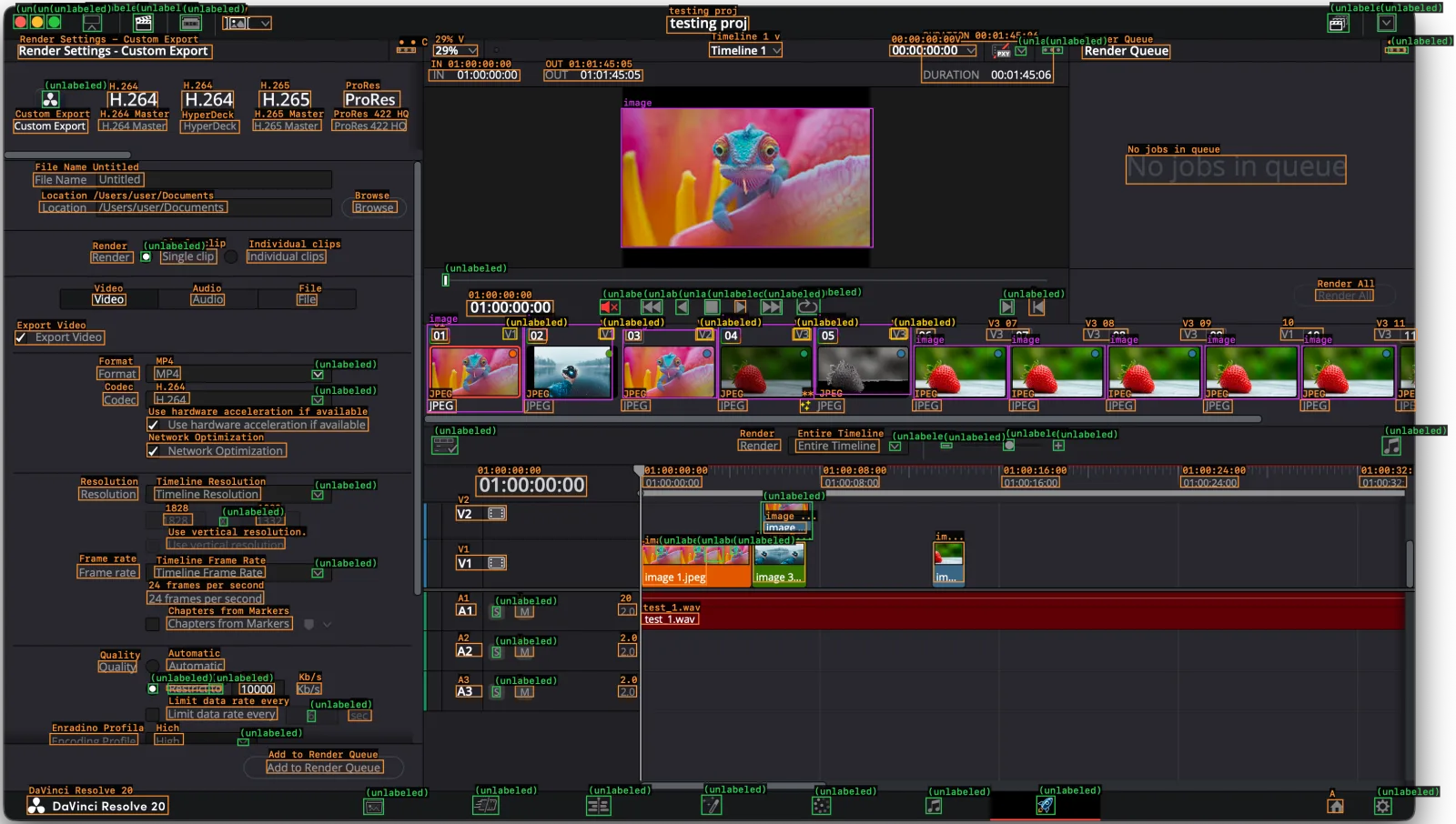
app: DaVinci Resolve
viewport_px[2]: 3248,1970
coordinates: "top-left pixels, rounded"
labeled[122]{type,label,x,y,w,h}:
  text,IR V,581,98,104,28
  text,testing proj,1533,98,175,35
  control,"DURATION 00:01:45:06",2079,152,283,89
  text,Timeline 1 v,1624,154,156,32
  text,Render Settings - Custom Export,143,160,416,30
  text,29% V,1033,160,94,24
  text,"00:00:00:00V",2011,160,185,24
  text,Render Queue,2423,160,188,30
  text,• • C,955,165,39,10
  text,• •c,3073,165,42,10
  text,"IN 01:00:00:00",1023,213,195,24
  text,"OUT 01:01:45:05",1270,213,211,24
  text,H.264,494,258,110,41
  text,H.265,659,258,110,37
  text,ProRes,841,258,120,35
  text,H.264,335,260,107,37
  image,image,1436,296,539,297
  text,Custom Export,133,319,159,30
  text,H.264 Master,315,319,146,24
  text,H.265 Master,646,319,146,24
  text,ProRes 422 HQ,815,319,159,24
  text,HyperDeck,490,321,127,28
  text,No jobs in queue,2517,396,471,61
  text,File Name Untitled,175,433,237,30
  text,Location /Users/user/Documents,188,494,403,24
  text,Browse,861,494,94,24
  text,Single clip,448,597,120,32
  text,Individual clips,633,599,169,28
  text,Render,299,603,91,24
  text,Render All,2923,684,123,24
  text,Video,302,693,71,24
  text,Audio,513,693,71,24
  text,File,741,693,42,24
  text,K,2309,701,32,37
  text,"01:00:00:00",1104,707,185,33
  text,•,1679,707,23,28
  image,image,1020,758,205,187
  image,image,1228,758,188,162
  image,image,1643,758,205,160
  image,image,1851,758,205,150
  control,"10",2848,766,91,26
  text,"01",1030,768,32,24
  text,"02",1237,768,39,24
  text,V1,1387,768,32,20
  text,"03",1445,768,32,24
  text,V2,1595,768,39,24
  text,V3,1803,768,39,24
  text,V3,2011,768,39,20
  text,"06",2069,768,39,24
  text,V3 07,2218,768,91,24
  text,V3 08,2426,768,94,24
  text,V3 09,2634,768,91,24
  text,V3 11,3050,768,91,24
  image,image,1439,770,201,146
  control,Export Video,136,772,192,30
  image,image,2062,804,201,114
  image,image,2267,804,205,114
  image,image,2478,804,201,114
  image,image,2686,804,201,114
  image,image,2894,804,201,114
  text,Format,312,849,91,28
  text,MP4,435,849,55,28
  text,Codec,325,904,75,28
  text,H.264,435,904,75,24
  text,** JPEG,1819,918,94,30
  text,JPEG,1020,920,62,28
  text,JPEG,1228,920,62,28
  text,JPEG,1436,920,62,24
  text,JPEG,1643,920,62,24
  text,IPEG,2059,920,62,24
  text,IPEG,2267,920,62,24
  text,IPEG,2475,920,62,24
  text,JPEG,2683,920,62,28
  text,JPEG,2891,920,62,24
  text,JPE,3095,920,42,24
  control,Use hardware acceleration if available,419,957,474,30
  text,Render,1686,1005,91,24
  text,Entire Timeline,1809,1005,179,28
  control,Network Optimization,419,1013,299,30
  text,"01:00:00:00",1124,1084,237,43
  text,"01:00:00:00",1481,1084,127,24
  text,"01:00:08:00",1864,1084,123,24
  text,"01:00:16:00",2251,1084,123,24
  text,"01:00:24:00",2634,1084,123,24
  text,"01:00:32:",3017,1084,101,24
  text,Resolution,273,1107,127,28
  text,Timeline Resolution,435,1107,227,28
  control,V2,1082,1147,107,32
  text,"1828",455,1164,62,24
  text,"1332",653,1164,62,24
  text,image ...,1741,1182,91,24
  text,Use vertical resolution.,461,1215,253,24
  control,image 3...,1718,1225,110,85
  control,im...,2105,1225,65,85
  control,image 1.jpeg,1481,1233,136,83
  control,V1,1082,1253,107,32
  text,Frame rate,270,1273,133,30
  text,Timeline Frame Rate,435,1277,237,24
  text,24 frames per second,419,1330,250,28
  text,A1,1082,1357,42,24
  text,M,1208,1357,39,28
  text,"20",1429,1357,39,24
  text,test_1.wav,1478,1377,123,24
  text,Chapters from Markers,461,1385,270,28
  text,A2,1082,1442,55,28
  text,"2.0",1429,1442,39,28
  text,M,1208,1446,39,24
  text,Automatic,461,1476,123,24
  text,Quality,315,1479,81,24
  text,"10000",617,1527,75,24
  text,Kb/s,741,1527,52,24
  text,bctrict to,461,1533,117,10
  text,A3,1082,1533,55,24
  text,M,1208,1533,39,24
  text,"2.0",1429,1533,39,24
  text,Limit data rate every,461,1578,237,28
  text,sec,851,1584,49,24
  text,Enradino Profila,211,1635,188,24
  text,Hich,435,1635,62,24
  text,Add to Render Queue,676,1692,250,28
  control,DaVinci Resolve 20,162,1769,302,39
  text,A,2949,1777,32,28
unlabeled[58]{type,label,x,y,w,h}:
  icon,(unlabeled),283,93,39,37
  icon,(unlabeled),390,93,42,39
  icon,(unlabeled),2949,93,45,39
  icon,(unlabeled),3056,93,39,37
  icon,(unlabeled),133,95,29,30
  icon,(unlabeled),169,95,29,30
  icon,(unlabeled),205,95,29,30
  icon,(unlabeled),490,95,45,33
  icon,(unlabeled),2280,164,23,18
  icon,(unlabeled),2339,164,42,14
  icon,(unlabeled),3079,164,42,14
  icon,(unlabeled),195,258,36,35
  icon,(unlabeled),406,603,19,20
  icon,(unlabeled),1052,650,13,26
  icon,(unlabeled),1812,701,49,35
  icon,(unlabeled),1390,705,42,32
  icon,(unlabeled),1478,705,45,32
  icon,(unlabeled),1553,705,26,32
  icon,(unlabeled),1614,705,32,32
  icon,(unlabeled),1734,705,45,32
  icon,(unlabeled),2248,705,29,32
  overlay-candidate,(unlabeled),1182,766,29,24
  overlay-candidate,(unlabeled),1390,766,29,24
  overlay-candidate,(unlabeled),1598,766,32,24
  overlay-candidate,(unlabeled),1806,766,32,24
  overlay-candidate,(unlabeled),2014,766,32,24
  icon,(unlabeled),773,857,23,18
  icon,(unlabeled),773,912,23,18
  icon,(unlabeled),1030,999,55,37
  icon,(unlabeled),3066,999,39,39
  icon,(unlabeled),2254,1005,23,24
  icon,(unlabeled),2361,1007,23,22
  icon,(unlabeled),2011,1011,23,18
  icon,(unlabeled),2121,1013,23,10
  icon,(unlabeled),773,1115,23,18
  icon,(unlabeled),1734,1139,110,81
  icon,(unlabeled),575,1172,16,18
  icon,(unlabeled),1510,1233,13,18
  icon,(unlabeled),1592,1233,13,12
  icon,(unlabeled),1614,1233,39,33
  icon,(unlabeled),1669,1233,13,18
  icon,(unlabeled),773,1282,23,18
  icon,(unlabeled),1160,1363,16,22
  icon,(unlabeled),1160,1450,16,22
  icon,(unlabeled),464,1527,88,24
  icon,(unlabeled),422,1529,19,20
  icon,(unlabeled),552,1529,29,22
  icon,(unlabeled),1160,1535,16,22
  icon,(unlabeled),763,1586,16,24
  icon,(unlabeled),614,1647,23,14
  icon,(unlabeled),1608,1767,42,41
  icon,(unlabeled),1117,1769,55,39
  icon,(unlabeled),1361,1769,52,41
  icon,(unlabeled),2326,1769,39,39
  icon,(unlabeled),1845,1771,39,37
  icon,(unlabeled),2088,1773,32,33
  icon,(unlabeled),3050,1773,36,35
icon,(unlabeled),883,1775,42,3301 / On your Mac
Each window becomes text, locally. Your model gets that text and your task, not your screen.
02 / Your data
App knowledge and conversations live in files on your Mac. Model requests go to your chosen provider.
03 / Open source
The engine that reads, acts and checks is open. Inspect it, build on it, contribute.
04 / Apache 2.0
Build on it.
The open source edition of Braus is licensed under Apache 2.0. Fork it and use it in your own projects.
View on GitHub01 / Legacy software
Automate repetitive steps in the desktop software your business already relies on.
02 / Desktop workflows
Your process crosses desktop tools and internal systems. You need automation where the integrations stop.
03 / Agent builders
Connect Claude Code or Codex to desktop tools over MCP, with structured window context and clear action results.
Blog
A background agent must finish its task while you continue yours. We examine Braus and Cua’s approaches, existing evidence and how to test interruptions properly.
 Loris Comba
Braus 1.1.0-2 brings optional native controls, Chrome and local app adapters alongside the virtual desktop, with mixed procedures and focused Pro Tools improvements.
Loris Comba
Keep scripts for stable rules and use agents for decisions that require interpretation. A practical framework for dividing work, testing app access and checking the result.
Loris Comba